#linux

  • Linux 7.3 is likely to be the next #lts kernel
    ▻https://www.omgubuntu.co.uk/2026/11/linux-7-3-lts-kernel-likely

    Linux 7.3 is looking like it’ll be the new long-term support (LTS) kernel. Greg Kroah-Hartman, one of the kernels’ key maintainers, intimated this in early November in a reply on the #linux_kernel Mailing List, discussing the status of Linux 7.4 and when it’s likely to be released. In a reply to Linus Torvalds, who’d noted people were expecting Linux 7.4 to be designated an LTS (since it’s shaping up to a big release and longterm kernels are picked, partly, based on being a feature-filled one) he said he planned for 7.3 to be LTS. “If people are trying to […] You’re reading Linux 7.3 is likely to be the next LTS kernel, a blog post from OMG! Ubuntu. Do not reproduce elsewhere without permission.

    #News

  • #mnt_reform Next, the ultra-open laptop, starts shipping
    ▻https://www.omgubuntu.co.uk/2026/11/mnt-reform-next-begins-shipping-for-real

    Before Framework took the idea of modular, easily upgradable laptops mainstream, there was the MNT Reform, a laptop with openness in every part of its design. I was pleased to see see (via notebookcheck) it’s started shipping high-end Hyper configurations of its laptop model, the MNT Reform Next, to backers of its 2025 crowdfunding campaign via Crowd Supply. These are going out later than originally planned – autumn 2025, initially – due to the various setbacks and hurdles that come with designing, engineering and manufacturing a truly open laptop, including firmware. MNT Research delivered 16 laptops to Crowd Supply last month, and […] You’re reading MNT Reform Next, the ultra-open laptop, starts shipping, a blog post from OMG! Ubuntu. Do not reproduce elsewhere without permission.

    #Hardware #News #Linux_Laptops

  • Prendre le contrôle de n’importe quel serveur Linux : Anthropic dévoile les capacités offensives d’un de ses modèles d’IA internes
    ▻https://www.usine-digitale.fr/cybersecurite/prendre-le-controle-de-nimporte-quel-serveur-linux-anthropic-devoile-

    De Chrome à Windows en passant par Linux, Anthropic affirme avoir utilisé un modèle d’IA interne, non publié, pour découvrir des failles et produire les programmes permettant de les exploiter. Dans un billet de blog publié le 27 octobre 2026, l’entreprise présente cinq démonstrations aux conséquences variées, allant du vol de données au plantage de serveurs, jusqu’à l’exécution de commandes à distance.

    Ces travaux ont été réalisés par son équipe de recherche en sécurité, la Frontier Red Team. Anthropic indique avoir signalé les vulnérabilités aux éditeurs concernés avant leur publication. Il s’agit donc d’expériences de laboratoire et non d’attaques observées par les entreprises.

    L’intérêt réside dans la capacité revendiquée du modèle à passer de la découverte d’une erreur à la production d’un exploit fonctionnel.
    .../...
    Le cas de Linux présente un risque particulièrement important pour les entreprises. En effet, Anthropic affirme avoir produit un exploit permettant à un hacker d’exécuter à distance des commandes avec les privilèges root, c’est-à-dire les droits d’administration les plus élevés sur le système. Et ce, sans identifiants ni intervention d’un utilisateur.

    #AI #hacking #Anthropic #Linux #enshitification #merdification

  • Ils vivent sans #Microsoft depuis 20 ans, eux : le choix payant de la #gendarmerie et du #fisc

    Si la plupart des ministères paient chaque année leurs licences Microsoft, la gendarmerie et le fisc ont remplacé la suite Office par des logiciels libres il y a une vingtaine d’années déjà. Un choix que la Cour des comptes cite en exemple, sans en cacher les limites.

    La #gendarmerie_nationale et la #direction_générale_des_finances_publiques (#DGFiP) font figure d’exception dans un État encore largement équipé en logiciels Microsoft. Dans son rapport du 22 octobre sur les outils bureautiques de l’État, la Cour des comptes s’attarde sur deux administrations qui ont tourné le dos aux logiciels bureautiques de Microsoft : la gendarmerie nationale et la direction générale des finances publiques (DGFiP). La première a poussé la logique jusqu’au système d’exploitation, la seconde a surtout misé sur LibreOffice pour alléger sa facture. Leur parcours dit beaucoup de ce qu’il faut pour réussir, ou rater, une sortie de Microsoft.

    72 000 ordinateurs sous #Linux, comment la gendarmerie a tourné le dos à Microsoft

    Les plus anciens et affûtés de la tech d’entre nous se souviendront qu’au début des années 2000, la direction générale de la gendarmerie nationale avait décidé de faire basculer son informatique vers le logiciel libre, dont le code est ouvert, modifiable et réutilisable par tous. La première étape fut de remplacer #Office par la suite #OpenOffice sur l’ensemble des postes. Cette dernière a ensuite cédé sa place à #LibreOffice au cours des années 2010, un changement passé presque inaperçu chez les gendarmes, selon la direction générale. L’intérêt était alors de respecter les standards ouverts et ne plus dépendre des éditeurs commerciaux.

    La gendarmerie est ensuite allée plus loin encore, en s’attaquant à Windows lui-même. Sa distribution Linux maison, #GendBuntu, équipe aujourd’hui 72 000 ordinateurs portables. Les messageries reposent elles aussi sur des logiciels libres, les derniers comptes #Outlook ayant été supprimés en 2024, et l’outil de partage de documents Partage NG sert à plus de 100 000 policiers et gendarmes aujourd’hui. Même la gestion électronique des documents repose sur un outil libre. Cette architecture centralisée jouit du fait que deux à trois personnes suffisent pour gérer les droits d’accès au niveau national, un vrai avantage.

    Le tout-libre connaît pourtant ses exceptions. Environ 2 500 postes restent sous #Windows et Office, pour échanger avec les autres ministères, notamment sur les questions budgétaires, ou faire tourner des logiciels métier qui ne fonctionnent que sous Windows, comme ceux liés aux plaques d’immatriculation ou à la vidéosurveillance. Et quand la gendarmerie a testé en 2022 une plateforme collaborative propriétaire de Dassault Systèmes, l’expérience a tourné court. Elle fut rejetée par la plupart des services et fut même abandonnée après onze mois et 2,3 millions d’euros dépensés, dont un million issu du plan France Relance. Le ministère de l’Intérieur estime que le coût, les politiques tarifaires et les stratégies des éditeurs propriétaires constituent un obstacle à un usage durable par l’administration.

    À la DGFiP, LibreOffice plutôt que #Word, pour des raisons d’argent

    À la DGFiP, la motivation a d’abord été financière. La direction a progressivement abandonné Microsoft Office à la fin des années 2000, principalement à cause de son coût, et a fait de LibreOffice sa suite bureautique principale. Sa messagerie a été refondue à partir de 2015 dans le cadre d’un programme interministériel bâti sur des briques libres, auquel elle a contribué avec les ministères de l’Intérieur et de la Transition écologique. Chez les agents, c’est le logiciel libre Thunderbird qui s’affiche à l’écran. Le fisc ne fait pas pour autant du libre une religion, puisque pour sa plateforme collaborative Novae, la DGFiP s’appuie sur le logiciel d’un éditeur français, enrichi des services de l’État comme la messagerie Tchap et de développements sur mesure commandés à l’éditeur, par exemple pour réserver salles et matériels.

    Quelques cadres ont d’ailleurs conservé Microsoft Office, notamment ceux qui échangent beaucoup avec l’extérieur ou qui ont besoin de fonctions avancées d’Excel. La direction reconnaît aussi un enjeu d’attractivité. Les agents qui arrivent d’autres organisations doivent s’adapter, et certains hauts fonctionnaires tiennent aux outils qu’ils utilisaient ailleurs. Le libre impose donc un effort d’adaptation que l’administration ne peut pas négliger.

    Les agents, eux, ne semblent en tout cas pas regretter l’illustre Word. Selon les enquêtes internes citées par la Cour, LibreOffice satisfait 87 % des agents de la DGFiP, et Novae 82 %. Au ministère de l’Intérieur, où à peine plus d’un poste sur dix dispose d’une licence Office hors gendarmerie, 95 % des répondants utilisent LibreOffice et 72 % s’en disent satisfaits. Plus largement, la Cour constate que la satisfaction ne dépend guère du choix entre logiciels libres et propriétaires. Ce sont surtout les habitudes des agents, la formation et l’accompagnement qui font la différence.
    Sortir de Microsoft, un pari rentable mais exigeant

    Sur le plan financier, l’avantage du libre ne fait pas débat. Une licence Microsoft Office coûte entre 150 et 200 euros par agent et par an selon la DINUM, la direction du numérique de l’État, quand LibreOffice est gratuit en version installée et que ses déclinaisons en ligne, comme Collabora, ne coûtent que quelques centimes par utilisateur. Le ministère de l’Intérieur, gendarmerie comprise, affiche ainsi une dépense de 20 euros par poste pour ses outils bureautiques et collaboratifs, contre 87 euros en moyenne dans l’État, un chiffre que la Cour prend avec des pincettes. En généralisant les logiciels libres installés sur les postes, sur le modèle de Bercy et de l’Intérieur, l’État économiserait de 30 à 65 millions d’euros par an, selon la Cour. Le libre n’est pas gratuit pour autant. Aux licences se substituent des frais d’intégration et de support, et il réclame des compétences techniques pointues, rares et très recherchées.

    La bascule peut aussi échouer, et le ministère de la Culture l’a appris à ses dépens. Passé au libre dans les années 2000, il est revenu à Microsoft Office à la fin des années 2010. Le cabinet du ministre était resté sous Office, et les désagréments dans les échanges de fichiers avec les directions ont eu raison du libre. Il est depuis passé à Microsoft 365 et affiche le coût par poste le plus élevé de l’État, soit 378 euros par an. À la Transition écologique, où le libre est pourtant une vieille culture d’ingénieurs, les cadres réclament la suite Microsoft avec insistance, même si le ministère limite encore à 10 000 le nombre de licences Office pour 25 000 postes. Les ministères qui mélangent les deux mondes citent les mêmes points irritants, avec des macros et tableaux croisés dynamiques difficiles à reproduire, des documents qui s’affichent mal d’un logiciel à l’autre, et des agendas incompatibles.

    Pour réussir, les directions du numérique souhaitent une démarche claire et soutenue au plus haut niveau, un accompagnement des agents dans la durée et une offre logicielle resserrée. L’Éducation nationale, qui propose à ses agents LibreOffice et sa déclinaison en ligne Collabora en plus de Microsoft Office, a ainsi misé sur des formations ciblées et un réseau d’« ambassadeurs » internes. Notons que le référentiel général d’interopérabilité de l’État recommande le format ouvert ODF plutôt que ceux de Microsoft. Et le mouvement gagne d’ailleurs le sommet de l’administration. En avril 2026, la DINUM a annoncé qu’elle allait à son tour quitter Windows pour Linux sur les postes de ses agents, avec deux configurations maison baptisées Sécurix et Bureautix. La Cour des comptes pousse l’État à aller plus loin, en engageant dès 2027 une migration de trois à quatre ans vers des outils bureautiques libres en ligne.

    ▻https://www.clubic.com/actualite-635755-ils-vivent-sans-microsoft-depuis-20-ans-le-choix-payant-de-
    #France

    #résistance #gafam #dégafamisation #logiciels_libres #linux #alternative #informatique #logiciels
    –-

    ajouté à la Métaliste sur les institutions et municipalités qui claquent les portes à #Microsoft :
    ►https://seenthis.net/messages/1143366

    • Raffarin veut du logiciel libre dans l’administration - LinuxFr.org
      ▻https://linuxfr.org/news/raffarin-veut-du-logiciel-libre-dans-ladministration

      Au cours d’une interview dans l’émission de Stéphane Paoli sur France Inter, ce matin, le 1er ministre a brièvement évoqué l’idée que l’administration pourrait utiliser des logiciels libres au lieu d’acheter des logiciels propriétaires. Seul l’aspect économique a été invoqué mais c’est déjà un début : M. Raffarin veut « faire en sorte que les communications inter-administrations passent par internet et l’utilisation des logiciels libres ». Il juge ainsi qu’il y aurait plus de 100 millions d’euros à économiser.

      et dire que tout le monde s’était bien moqué de lui à l’époque (mai 2004)…

  • #Linux_Mint is ‘bringing back’ hibernation to laptops
    ▻https://www.omgubuntu.co.uk/2026/11/linux-mint-hibernation-sleep-mode

    Linux Mint’s next release will offer a hibernation mode, so you can close your laptop mid-session and not worry about returning to a drained battery. A new Sleep Modes page in the System Administration tool in Linux Mint 27, out this December, makes it easy to enable hibernation and ensure it’s setup the way you need. Current versions of Linux Mint #suspend when you close the laptop lid. Though snoozing, the device continues to use some power. If the battery runs out while sleeping, the suspended session is kaput – an outcome “worse than a normal shutdown”, say Mint. Hibernation […] You’re reading Linux Mint is ‘bringing back’ hibernation to laptops, a blog post from OMG! Ubuntu. Do not reproduce elsewhere without permission.

    #News

  • Epic’s vibe-coded games launcher is available to test on Ubuntu
    ▻https://www.omgubuntu.co.uk/2026/10/epic-confirm-fortnite-linux

    Epic Games has confirmed that #Fortnite is coming to Linux, and the launcher it will arrive through is available to try in preview on Ubuntu – a vibe-coded wonder that’s been royally roasted on the internet. The #Gaming company has also announced a rebuilt version of its anti-cheat tech for Linux, which will be required to run Fortnite to Linux. Easy Anti-Cheat v2‘s stricter system requirements include a signed kernel and TPM 2.0. Easy Anti-Cheat has been available on Linux for a while, including for PC games running via Proton. Not all games developers trust or use it as it’s […] You’re reading Epic’s vibe-coded games launcher is available to test on Ubuntu, a blog post from OMG! Ubuntu. Do not reproduce elsewhere without permission.

    #News #epic_games #linux_gaming #LLM_Assisted #Valve

  • Linux 7.3 is out, speeds up ext4 and low-VRAM AMD GPUs
    ▻https://www.omgubuntu.co.uk/2026/10/linux-7-3-features

    Linux 7.3 is out with faster ext4, better performance on AMD GPUs with low VRAM and a new cgroup scheduling mode. 2026 Steam Controller driver debuts. You’re reading Linux 7.3 is out, speeds up ext4 and low-VRAM AMD GPUs, a blog post from OMG! Ubuntu. Do not reproduce elsewhere without permission.

    #News #linux_kernel

  • #Linux_Mint’s new system monitor does more than you’d expect
    ▻https://www.omgubuntu.co.uk/2026/10/linux-mint-new-system-monitor

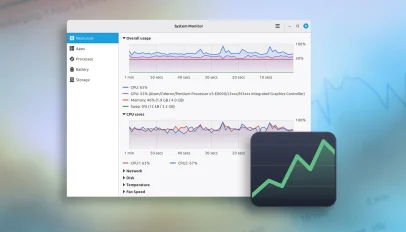
    December’s Linux Mint 27 release will include a brand new system monitor tool preinstalled. The app is called #superlight (well, that’s the project and package name; the user-facing label is just System Monitor). It shows hardware, app and process usage, relays battery stats and has an interactive storage page to find out what files and folders are using the most space. It’s still under active development, but I took it for a spin to see how it fares and what it offers. Keep in mind that more features may be added or changed between now and when it gets its […] You’re reading Linux Mint’s new system monitor does more than you’d expect, a blog post from OMG! Ubuntu. Do not reproduce elsewhere without permission.

    #News #xapps

  • #Linux_Mint 27 ‘Adrien’ due this Christmas with MORE new apps
    ▻https://www.omgubuntu.co.uk/2026/10/linux-mint-27-adrien-due-at-christmas

    Linux Mint shook up its release schedule this year and now it’s shaking up its versioning scheme as well – the next major release won’t be Linux Mint 23, but Linux Mint 27. Releases will now be numbered by year. Linux Mint 27 will be followed by v28, and so on. The release also sees the start of a new series of release codenames. Mint has traditionally used feminine first names, cycling through the alphabet from Linux Mint 1.0 ‘Ada’ in 2006 through to Linux Mint 22.3 ‘Zena’ in 2026. The series returns to ‘A’ with Linux Mint 27 and […] You’re reading Linux Mint 27 ‘Adrien’ due this Christmas with MORE new apps, a blog post from OMG! Ubuntu. Do not reproduce elsewhere without permission.

    #News #Cinnamon #xapps

  • Play #Roblox on Linux without Wine, using #sober
    ▻https://www.omgubuntu.co.uk/2026/10/play-roblox-linux-sober

    Roblox does not officially support Linux, but Linux users can run using Sober, an unofficial third-party ‘port’ that works without Wine (hence the name). I know; this isn’t a ‘game’ most of you are itching to play. Roblox users are mostly under 16, access it via mobiles and have an unhealthy interest in Robux, the in-game virtual currency. But you may – as I – have snotty relatives who demand to play it on your laptop because their tablet needs charging… Performance ‘the same or better’ than Windows Sober is a ‘specialised runtime just for Roblox’s code’ made by the Vinegar project, […] You’re reading Play Roblox on Linux without Wine, using Sober, a blog post from OMG! Ubuntu. Do not reproduce elsewhere without permission.

    #Gaming #News #linux_gaming

  • #Linux_Mint reveals two brand-new desktop apps
    ▻https://www.omgubuntu.co.uk/2026/09/linux-mint-new-apps

    Two new apps are coming to Linux Mint later this year: a new #calendar and eBook reader. Plus, the Ubuntu-based Linux distribution has redesigned its (overlooked) document hub, Library, to make it easier to find and manage documents scattered across you device from one place. Both new apps join the XApp Project, Linux Mint’s collection of home-grown, cross-desktop GTK apps (which now has a new website wearing the popular Claude design aesthetic). Clockenstien is Mint’s new Calendar app Clockenstein is Linux Mint’s new calendar app but, lest anyone scream in horror at the terrible name, the user-facing label is just […] You’re reading Linux Mint reveals two brand-new desktop apps, a blog post from OMG! Ubuntu. Do not reproduce elsewhere without permission.

    #News #ebooks #xapps

  • #Ubuntu_26.10 will ship with #linux_kernel 7.3
    ▻https://www.omgubuntu.co.uk/2026/09/ubuntu-2610-kernel-version

    Ubuntu 26.10 ’Stonking Stingray’ is getting a newer kernel than planned. Canonical has switched its target from Linux 7.2 to Linux 7.3. You’re reading Ubuntu 26.10 will ship with Linux kernel 7.3, a blog post from OMG! Ubuntu. Do not reproduce elsewhere without permission.

    #News

  • #Canonical joins the Open Secure AI Alliance
    ▻https://www.omgubuntu.co.uk/2026/09/canonical-joins-open-secure-ai-alliance

    Canonical recently joined the #linux_foundation’s Open Secure AI Alliance to help make open-source security tools for AI systems and autonomous agents. The alliance formed in July 2026 in response to the security breach at #Hugging_Face, when OpenAI models undergoing a safety test broke out of their sandbox to access Hugging Face’s systems – aided by config errors rather than super-intelligence. Commercial AI models refused to help in assessing attack logs due to their guardrails, so Hugging Face engineers had to run an open-weight model on their own infrastructure to complete their analysis – and underscore the need for […] You’re reading Canonical joins the Open Secure AI Alliance, a blog post from OMG! Ubuntu. Do not reproduce elsewhere without permission.

    #News #AI/ML

  • Linux 7.2 brings cache-aware scheduling, faster #ext4 and Btrfs
    ▻https://www.omgubuntu.co.uk/2026/08/linux-7-2-cache-aware-scheduling-ext4-btrfs

    Linux kernel 7.2 has been released, adding cache-aware scheduling, ext4 filesystem performance boosts and a slew of new and improved hardware drivers for laptops and peripherals. A merge widow record was also set during the 9-week development cycle, with more than 2,100 individual contributors involved. AI, obviously, has helped. Commit-crunching by LWN found roughly 5% of commits in 7.2 have an ‘assisted-by’ tag, indicating AI usage. Not that the latest kernel update was all additions. More than 13,000 lines of code for legacy i486 CPU emulation were removed from Linux 7.2, as was a 40-year-old Hercules graphics card driver, AppleTalk […] You’re reading Linux 7.2 brings cache-aware scheduling, faster ext4 and Btrfs, a blog post from OMG! Ubuntu. Do not reproduce elsewhere without (…)

    #News #linux_kernel #mediatek #RealTek

  • #GeForce_Now’s Linux app drops its beta tag, gets Flatpak repo
    ▻https://www.omgubuntu.co.uk/2026/08/nvidia-geforce-now-linux-stable

    GeForce Now’s native Linux app has exited beta after seven months of testing, with official support for Ubuntu 24.04 LTS and later. The app is a frontend for #NVIDIA’s game streaming service, with over 4,500 PC titles running in the cloud on Nvidia servers. Users get GeForce RTX-class performance, ray tracing and DLSS without the need to own the relevant hardware. In a blog post to announce its ‘graduation’ from beta, Nvidia say GeForce NOW for Linux has picked up “performance, stability and polish” improvements thanks to community feedback during the beta test period. The company also touches on some […] You’re reading GeForce NOW’s Linux app drops its beta tag, gets Flatpak repo, a blog post from OMG! Ubuntu. Do not reproduce elsewhere without permission.

    #News #App_Updates #linux_gaming

  • #Linux_Mint now deletes old kernel versions automatically
    ▻https://www.omgubuntu.co.uk/2026/08/linux-mint-deletes-old-kernels-automatically

    Linux Mint has announced an overhaul in its kernel management, and will now automatically delete old kernels once a week. Kernel management is moving out of Update Manager and into the System Administration tool on both standard and LMDE versions and it will now tracks kernels by series rather than individual versions. You’ll get to choose which kernel series’ are tracked and how many older kernels within each series the system should keep (in addition to the one you’re booted on; it doesn’t yank out the rug under its own feet). Updates for tracked series’ kernels continue to appear in […] You’re reading Linux Mint now deletes old kernel versions automatically, a blog post from OMG! Ubuntu. Do not reproduce elsewhere without permission.

    #News

  • #Linux_Mint 22.3 #HWE released with Linux kernel 7.0
    ▻https://www.omgubuntu.co.uk/2026/08/linux-mint-linux-kernel-7-hwe

    A refreshed Linux Mint 22.3 (Zena) OS installer is available for download, powered by Linux kernel 7.0. The distro made the first Linux Mint 22.3 HWE ISO available in March, with an installer that boots Linux 6.17 by default. That image remains available to download alongside the newest one, which boots Linux 7.0, and the original Linux Mint 22.3 (Zena) ISO that boots Linux 6.14. The Linux Mint HWE images provide the same core Linux Mint 22.3 experience, still based on Ubuntu 24.04 LTS, but it all sits on top of a refreshed hardware stack. Existing Mint users don’t need […] You’re reading Linux Mint 22.3 HWE released with Linux kernel 7.0, a blog post from OMG! Ubuntu. Do not reproduce elsewhere without permission.

    #News

  • #Linux_Mint 23 will have full #Wayland support (but X11 is staying)
    ▻https://www.omgubuntu.co.uk/2026/07/linux-mint-wayland-fully-supported

    Linux Mint says Wayland support in its next release will no longer be considered experimental, but available as a fully-supported option. However, it will continue to provide and support X11, unlike other Linux distributions which have jettisoned the legacy Xorg/X11 display server from their default installations – Ubuntu dropped Xorg support in 25.10. “We worked really hard on Wayland and we got to the point where it feels solid and the experience is almost on par with X11”, Clement Lefebvre wrote in an update, confirming “both X11 and Wayland will be fully supported” in the next release. Whether Wayland will become […] You’re reading Linux Mint 23 will have full Wayland support (but X11 is staying), a blog post from OMG! Ubuntu. Do not reproduce elsewhere without permission.

    #News #Cinnamon

  • Ciao Microsoft – Nach 30 Jahren bin ich komplett raus !
    ▻https://www.metacheles.de/ciao-microsoft-nach-30-jahren-bin-ich-komplett-raus

    Comment se débarasser de Microsoft - c’est une vive déscription enthousiaste qui fait comprendre le mélange de frustration et d’euphorie après la soi disant solution de l’énième désastre windows qui rend accro les esclaves et vaches à traire que sont les « utilisateurs » de Microsoft.

    Il est sympa ce Sascha Pallenberg mais je trouve que sa solution manque de radicalité. Pour moi dans le contexte actuel européen ces questiions prennent une importance de vie et de mort, alors quitter MS n’est que la première étape de la désintoxication et du chemin vers l’autonomie.

    27.6.2026 von Sascha Pallenberg - In der dritten Januarwoche 2026 habe ich die letzten Microsoft-Services abgestossen. Daten runter, Accounts geschlossen, fertig. Ich bin Microsoft-frei. Nach ueber drei Jahrzehnten als User, Anwender, Kunde, Fanboy, Evangelist, Supporter, Blogger und YouTuber. Und wisst ihr was? Es fuehlt sich verdammt gut an!

    n leben ohne Microsoft - Eine historische Folge

    Das hier ist keine normale Ausgabe. Das ist ein Abschied. Einer, der laengst ueberfaellig war!

    Anfang Dezember hatte ich auf MeTacheles angekuendigt, dass Microsoft Windows zerstoert hat und ich zu Linux wechsle. Sechs Wochen spaeter ist der Prozess abgeschlossen. Komplett. OneDrive weg, Outlook weg, Office 365 weg, Authenticator App... naja, die schickt mir immer noch Benachrichtigungen, obwohl ich seit einer Woche raus bin. Aber dazu spaeter mehr.

    Microsoft hat Windows zerstoert!

    ... und warum ich zu Linux wechsle Satya Nadella prahlte im April 2025 damit, dass 20–30 % des Windows-Codes inzwischen von Maschinen geschrieben wird. Und ploetzlich ergibt alles Sinn: Ein Betriebssystem, das sich anfuehlt wie ein technisches Experiment – instabil, ueberladen, werbeverseucht und voller Telemetrie!

    Was mich selbst ueberrascht hat: Es war einfacher als gedacht. Wer heute von Windows zu Linux wechseln will, kann das – je nach Komplexitaet der eigenen Anwendungsszenarien – innerhalb von wenigen Stunden bis maximal einem Wochenende schaffen. Zumindest fuer private User und Freelancer, die nicht auf Windows-exklusive Software angewiesen sind.

    Linux: Es funktioniert einfach

    Ich hab mich z.Zt. fuer Linux Mint und Bazzite Linux entschieden, in der Desktop-Variante. Gaming war meine groesste Sorge – laufen meine Steam-Spiele ueberhaupt unter Linux? Wie sieht’s mit Treibern aus?

    Die Antwort: Alles laeuft. Meine RTX 4070 Ti von Nvidia? Performt unter Linux besser als unter Windows. Das System bootet schneller, die Games laden schneller, und ich habe keine Werbung im Startmenue. Keine Explorer-Abstuerze, keine White-Screens, keinen MSN-Muell.
    MSN ist das Windows 11 fuer aktuelle „Nachrichten“ und da habe ich noch nicht einmal die Kommentarspalten angesprochen, in denen Schwurbler und rechte Hetzer freidrehen!

    Apropos MSN: Macht euch mal den Spass und geht auf msn.de. Guckt euch an, was fuer „News“ euch da geliefert werden. Das Uebelste vom Ueblen in Sachen Yellowpress. Und so fuehlt sich Windows 11 insgesamt an – stuemperhaft, werbeverseuchst, nervig.

    Ich bin raus. Komplett raus. Und es ist klasse.

    OneDrive: Eine Katastrophe in Zeitlupe

    Jetzt wird’s interessant. Was passiert, wenn du seit ueber einem Jahrzehnt Office 365 User bist und entsprechend viel auf OneDrive gespeichert hast?

    Kurze Antwort: Schmerzen!

    Ich dachte, OneDrive waere der einfachste Teil. Browser auf... Ordner runterladen... fertig! Falsch gedacht.

    Die Download-Geschwindigkeit? An meiner Gigabit-Leitung im Schnitt 3 MB pro Sekunde. Manchmal Peaks auf 7-8, manchmal – und das hab ich seit 30 Jahren nicht mehr gesehen – im Byte-Bereich. Und dann die Downloads, die bei 20-21 GB einfach abbrechen. Ohne Warnung, ohne Fehlermeldung. Einfach weg.

    Thirdparty-Tools wie Forklift, die null Probleme mit Google Drive haben? Verbinden nicht vernuenftig mit OneDrive. Die offizielle OneDrive-App? Synct den gesamten Rotz lokal runter, bevor du ueberhaupt was kopieren kannst. Und bricht dabei staendig ab.

    Am Ende hab ich 23 Runden gedreht, einzelne Ordner manuell im Browser runtergeladen. Und dann waren die ZIP-Dateien teilweise unter macOS nicht entpackbar – ich musste mir extra Unarchiver installieren.

    Ich bin ja wahrlich kein Choleriker... aber mal ganz ehrlich, ich hatte kurzeitig das Gefuehl, dass ich einfach tabula rasa mache und alles loesche. Weg damit.. Ende, harter Cut! OneDrive hat mich wuetend gemacht... sehr wuetend!

    Digital Independence Day #1 - Email-Anbieter einfach wechseln

    Accounts, Mail, Cloud, Betriebssystem, Plattformen — vieles in unserem Alltag haengt an wenigen Big-Tech-Konzernen. Und genau deshalb feiern wir den Digital Independence Day: den ersten Schritt raus aus diesen Abhaengigkeiten – Schritt fuer Schritt, bewusst, nachhaltig. In der ersten Ausgabe der Reihe geht es rueber zu sicheren Email-Anbietern!

    Die Microsoft Authenticator App – ein Clusterfuck

    So, und jetzt wirds richtig lustig. Die Microsoft Authenticator App begleitet mich seit einem halben Jahr.... und zwar bis in meine Traeume! Aber nicht, weil sie so gut ist.

    Ich hab den Umstieg vor sechs Tagen abgeschlossen. Ich bekomme heute noch – waehrend ich das hier aufnehme – kontinuierlich Benachrichtigungen, ich solle einen Account-Login bestaetigen. Fuer Microsoft Outlook. Einen Service, den ich nicht (auch) nicht mehr nutze und in den ich mich auch nirgends mehr einloggen will!

    Alle 2, 3 Stunden laesst mich Microsoft wissen, wie nervig deren Produkte sind!

    Das Beste: Vor ein paar Monaten war ich bei OneDrive ausgeloggt, neues Telefon, auch bei der Authenticator App ausgeloggt. Und sollte bestaetigen, dass ich mich in die Authenticator App eingeloggt habe – mit einer Zahl, die ich in der Authenticator App eingeben soll. In der ich ausgeloggt bin. WTF?!

    Wer probiert sowas aus bei Microsoft? Wer prueft das? Niemand offensichtlich.
    Office 365: Hallo OnlyOffice

    Fuer Office bin ich zu OnlyOffice gewechselt. Von Ascensio Systems aus Riga, Lettland. Ja, es gab mal Debatten wegen frueherer russischer Verbindungen, aber das Projekt gilt als lettisch und ist Open Source. Ich nutze es nur lokal, nicht in der Cloud.

    Und es ist sauschnell. Rechnungen schreiben, PowerPoint-Bingo spielen, hier und da mal ein Word-Dokument bearbeiten – alles kein Problem. Die Kompatibilitaet mit Microsoft-Formaten ist gut. Und wenn ich vergleiche, wie lange Word, Excel und PowerPoint zum Oeffnen brauchen... meine Guete, ich glaube, allein durch das Oeffnen dieser Apps habe ich ein halbes Jahr Lebenszeit verloren.

    Mein neues Setup: Dreifach diversifiziert

    Wo liegen jetzt meine Daten? Hybrid und dreifach abgesichert:

    1. IONOS Nextcloud – fuer viele Daten, europaeischer Anbieter, deutsches Rechenzentrum

    2. Proton – die komplette Suite fuer besonders sensible und persoenliche Daten. Die diversifizieren uebrigens zwischen Schweiz und Deutschland und bauen immer mehr Rechenzentren in der EU

    3. Lokal auf meinem NAS – fuer den Fall der Faelle

    Taiwan, Deutschland, Schweiz, lokal. Das ist digitale Souveraenitaet.

    Warum das wichtig ist

    Nach all dem Aerger hab ich mich gefragt: Warum machen die das so? Warum ist der Download so lahm? Warum bricht alles ab? Warum funktioniert die Authenticator App nicht?

    Die Antwort ist simpel: Arroganz. Die unsaegliche Arroganz eines Monopolisten, der uns alles reinschaufeln kann, was er will. Weil wir ja eh nicht weggehen. Weil wir abhaengig sind. Weil wir seit Jahrzehnten darauf konditioniert wurden, dass das halt so ist.

    Und es war gar nicht so schwer – wenn man mal davon absieht, dass Microsoft dir jeden Stein in den Weg legt, den sie finden koennen.

    Microsoft hat uns zu Usability-Verweigerern erzogen. Das ist keine coole, einfache, freundliche Benutzerfuehrung. Das ist das genaue Gegenteil: So komplex, so kompliziert, so nervig wie moeglich. Damit du nach zehn Minuten sagst: Ich lass es sein, ich bleib.

    Nicht mit mir. Nicht mehr!

    Das Fazit

    Der ganze Prozess hat etwa 36 Stunden gedauert – mit Pausen und Schlaf natuerlich. Und jetzt bin ich raus. Arrivederci Redmond, hallo freie Welt!

    Es fuehlt sich gut an. Du denkst dir: Wow, ich hab das wirklich geschafft. Und es war gar nicht so schwer – wenn man mal davon absieht, dass Microsoft dir jeden Stein in den Weg legt, den sie finden koennen.

    Was wir mit uns machen lassen. Wie sehr wir uns in den letzten Jahrzehnten darauf verlassen haben, dass bei Microsoft alles toll ist und gut laeuft. Das Gegenteil ist der Fall.

    Nach dieser durchaus traumatischen Erfahrung gibt es fuer mich wirklich kein Zurueck mehr. Zumindest nicht in diesem Leben. Never ever again!

    Halt! Eine Ausnahme gibt es tatsaechlich: LinkedIn ist der letzte Microsoft-Service, den ich noch nutze. Irgendwo muss ja auch in Zukunft der Wahnsinn im direkten Kontakt mit den Verantwortlichen, kommuniziert werden.

    Also: Denkt mal drueber nach, ob ihr euch nicht auch mal am Wochenende hinsetzt, das alles plant, eine schoene Liste macht – und dann sagt: Ciao Redmond, hallo freie Welt!

    Es lohnt sich. Versprochen.

    #Microsoft #monopole #FLOSS #Linux #désintoxication